Build once, deploy to your own network, stay accountable
CrewWork builds a versioned OCI release artifact from your project and ships it to any host on your own LAN. Nothing inbound reaches the target host, and on-call escalation is automatic when a deployment fails.
- Outbound-only mTLS agent
- gVisor-isolated builds
- Automatic failure escalation
- build OCI artifact in gVisor BuildKit
- publish to your private registry
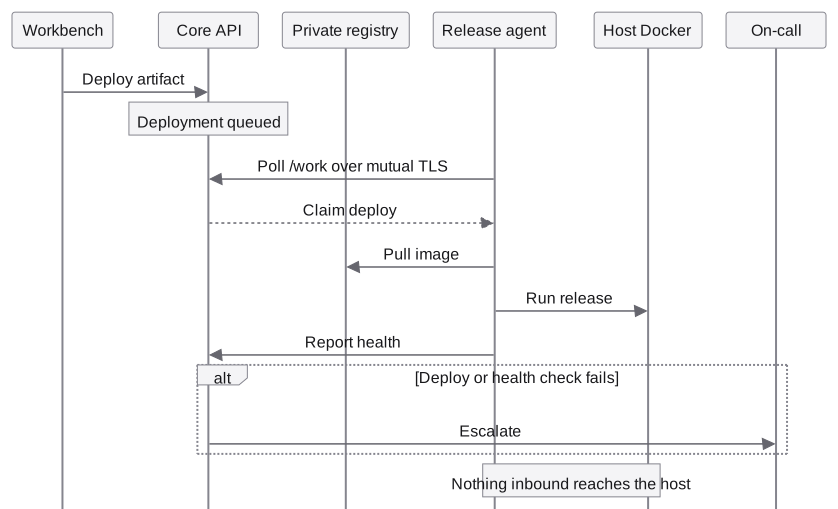
- claim the agent polls over mutual TLS
- deploy on the host’s own Docker
- health checked after deploy
- escalate a failure pages on-call; rollback is a person’s call
A deployment path that never asks your network to open a port
CrewWork builds a linux/amd64 or linux/arm64 OCI release artifact and stores it in an opt-in, intranet-only registry. A small release agent on any host on your LAN, a workstation, a rack server, a home lab box, claims the next queued deploy and carries it out. This picks up after delivery work: it takes a built artifact and runs it on infrastructure you control.
Deployments, signed artifacts, and environments live in the selected Project’s release workspace, with health history alongside host enrollment. Rollback stays a deliberate, human-triggered action, never automatic. Initial provisioning (release CA setup, per-host agent certificates, registry credentials) remains an operator command-line step.
The release agent
- outbound only
- The release agent polls a certificate-authenticated /work endpoint over mutual TLS. Nothing inbound reaches the target host to trigger a deploy.
- locked down
- Read-only root filesystem, every Linux capability dropped, privilege escalation disabled, a 128-process limit, and a 256MB / 0.5 CPU resource ceiling.
- operations
- Deploy, health, rollback, and remove only, executed directly against the host’s own Docker socket.
- registry
- Artifacts come from an opt-in private registry, enabled with a single deployment profile. Release tags derive from the exact source commit and build recipe, and image deletion is disabled, so a published artifact cannot be silently deleted or quietly swapped under the same identifier.
Deployment states
- queued
- Deploy request accepted and waiting for the release agent to claim it.
- running
- The release agent is executing the deploy against its host Docker socket.
- healthy
- The deployment passed its health checks and is the current release for that environment.
- failed
- Deploy or health checks failed. This is one of the three events on-call escalation watches for.
- superseded
- A newer deployment replaced this one as the environment’s current release.
- rolled back
- The environment was reverted to its prior healthy deployment.
- removed
- The deployment was explicitly torn down from the target host.

The build itself runs sandboxed, not just the deploy
Release images are built by a dedicated BuildKit worker that embeds its own patched buildkitd and containerd, so every RUN step in your Dockerfile executes under gVisor (runsc) on an isolated bridge network with its own cgroup. See Runtime Isolation for the full sandboxing model across previews, tests, and validation.
A failed deployment pages someone. Automatically.
Teams define timezone-aware on-call schedules and escalation routes once, and CrewWork handles the rest whenever a release goes wrong. Teams manage rotations and routes in the Organization utility’s On-call area, as well as through the API.
- targets
- Read the same roles described in Organizations & Teams, so paging “team leads” always reflects who holds that role now.
- schedule
- A rotation: an ordered list of participants, a rotation start time, and a shift length. Whoever is on shift is computed from elapsed time, not a manually updated calendar.
- route
- A named path of ordered steps, each with a delay and a target: the person on call, the team leads, or the organization admins.
- triggers
- Three events escalate automatically: a failed deploy, an unhealthy deployment, and a failed rollback.
- delivery
- Notifications are persisted to a durable outbox and delivered as per-user webhooks, rechecking live project, team, and route authority immediately before each external send. Each person sets their own delivery URL from Settings, with loopback, credential-bearing, and local-network targets rejected automatically.
- offboarding
- Removing someone from a team automatically reindexes or disables the rotations and routes that named them, so an escalation step never silently pages someone who has already left.
See whether CrewWork fits your work.
CrewWork is built and running, and not yet generally available.
- worth discussing
- The errors and backlog you would hand off
- Where your source has to stay
- The evidence you would need to trust a change